

Update, 13 October 2026: the results are in. Jane Hart published the Top 100 Tools for Learning 2026 on 7 September, and after 20 years it’s the final list. ChatGPT took the top spot, ending YouTube’s ten-year run. The top ten: ChatGPT, YouTube, Gemini, PowerPoint, Claude, Google Docs & Drive, NotebookLM, Word, Google Search and Canva.
All ten tools on our ballot made the list: YouTube (#2), Claude (#5, the year’s biggest climber), Google Docs & Drive (#6), NotebookLM (#7), ElevenLabs (#43), Synthesia (#44), Descript (#54), HeyGen (#79), SuperWhisper (#95) and Makeshapes at #98, a new entry. Thank you to everyone who voted. Our original ballot follows.
Every year since 2007, Jane Hart has asked people who care about learning to name the ten digital tools they’d struggle to work without. The list that comes back is one of the more honest artifacts in our field, because nobody is selling anything—it’s just practitioners saying what they actually open.
The 20th survey is running now. Voting closes at noon BST on Thursday 27 August, and anyone can vote. We did, and we’re publishing our ballot because a vote you wouldn’t put your name to isn’t worth much.
Two things to declare first
Almost nothing on a list like this is built for the conversation itself—ours included. When we ask learning teams how they get a group to actually talk, the answer is usually skilled facilitation, or the more hopeful version—a discussion guide, a team play—and failing those, a central expert answering comments, a slide deck, or a webinar. That’s the gap we keep writing about: why dialogue is the destination. It’s also why Makeshapes is on our list, and Makeshapes is ours. That’s the first bias—discount it accordingly.
The second bias is subtler. Most of our ten exist to make content—capture an idea, draft a script, generate a voice, render a presenter, cut a video, write a document—and helping customers make content is part of what we do too. The cost of all of that has collapsed. The cost of getting a group of people to genuinely connect and learn together remains a barrier. It’s the same tradeoff between scale and impact teams have been forced to make for years. What’s changed is that only the scale side got better tools.
Cheap creation has a dark side: a great deal of fluff for employees to wade through, or what Barbara Harvey calls learning landfill. And much of it is now more digestible by machines than by people. AI agents can already click through an e-learning module end to end: read the screen, answer the quiz, collect the completion. If a bot can finish your training, the training was never the learning.
The ten
1. Makeshapes—ours, as declared. We use it to run small-group sessions without needing a skilled facilitator in every room. The reason it’s on a personal list and not just a product page: it’s how our own team learns together, and it’s the tool here we’d notice the fastest if it went away.
2. Claude—research, idea generation, and working out the shape of a conversation before it happens. It’s also become our copywriting collaborator: first drafts of learning content and storyboards, produced fast enough that the draft is something to react to rather than something to defend. That second job is the one that changed how quickly work starts.
3. SuperWhisper—dictation. Raw ideas and first drafts get spoken rather than typed. The gap between having a thought and having it written down is where most content quietly dies.
4. Google NotebookLM—the clearest way we’ve found to interrogate a large pile of material without having to organise the pile first. It also turns that material into a conversation between two synthetic hosts, which means any learning event can become an on-demand podcast for the people who missed it, or for the same people six weeks later when it’s fading. We’ve tried it on our own community gatherings. It’s uncanny, and it’s useful.
5. ElevenLabs—voice cloning and text-to-speech that finally cleared the “good enough” bar. Re-recording one sentence used to mean rebooking the talent. Now the script is the source of truth and the audio follows.
6. Synthesia—the same collapse, applied to video. Most workplace video doesn’t need a human on camera; it needs to exist, be current, and be watchable in eleven languages.
7. HeyGen—realistic AI avatar video, where the use that won us over isn’t the obvious one. It’s drafting: mock up what the subject-matter expert would say, show it to them, and let them correct a draft instead of facing a blank script and a camera. Getting an expert to react is far easier than getting one to perform.
8. Descript—video capture and editing without the complexity of a traditional production suite. Simple enough that anyone on the team can use it, powerful enough that nobody has needed to graduate off it. That combination is rarer than it sounds.
9. Google Docs—unglamorous and load-bearing. It’s where needs assessments get completed and where storyboards get argued over with a client. Every few years something claims to replace it for collaborative drafting, and every few years it doesn’t.
10. YouTube—the obvious one, and we considered leaving it off for exactly that reason. It stays because of what it’s genuinely for: hearing a real human explain the thing you’re trying to learn, and then watching them do it. The in-between steps are where instruction usually fails—the parts documentation skips because they seem too obvious to write down, and the parts you only notice by watching someone’s hands. Nine tools on this list can generate an explanation. This is still the one we open when we need one.
What we see our customers using
Not on our ballot, because they aren’t tools we open ourselves. But it’s the part we’d want to read on someone else’s post, so here it is—what we see across the organisations we work with.
- Articulate (Storyline and Rise)—still the standard for building interactive e-learning, used where teams need SCORM-compliant self-paced modules rather than live sessions.
- Synthesia and HeyGen—avatar video, for use-led content without a camera, a studio, or a presenter.
- ElevenLabs—the same voice tooling we use, arriving in customer workflows at about the same speed.
- Camtasia—screen recording and editing for how-to and software-demo content, valued specifically for being simpler than a full production suite. We reach for Kap ourselves—free, open-source, and enough for a thirty-second clip.
- Padlet—flexible interactive boards, mostly supporting asynchronous engagement inside blended programs.
- Menti and Slido—live polling and audience interaction in facilitator-led sessions. Two tools doing the same job, usually chosen by whichever one the organisation already had.
- Canva—quick asset creation, largely by people who don’t consider themselves designers.
- Chameleon Creator—for building visually appealing learning experiences without a design team.
- Microsoft Copilot—less chosen than arrived at, but genuinely used, and it sits alongside most of the above rather than replacing any of it.
What else shaped the year
None of these are tools, so none are on the ballot. All of them changed how we think, which arguably matters more.
- Peoplestorming on making learning stick, and on peer formats like Round Tables and Lean Coffee. Their piece on the knowing–doing gap is the one we’ve sent to the most people.
- Digby Scott on shifting from heroing to hosting—from “I have the answers” to “they have the answers.” Short idea, hard practice.
- Priya Parker on gathering with intent. Hybrid work made her work more relevant, not less.
- David Rock and the NeuroLeadership Institute on designing for insight, and the Eureka Scale as shared language for it.
- Geoff Rip on the predictability of learning transfer, and his Ready-Set-Go-Show framework. He’s worth an hour on the Learning While Working podcast.
- Learning Uncut, where Michelle Ockers and Ryan Tracey make the case that face-to-face delivery is too important to put in the too-hard basket.
- Liberating Structures—not software, so not on the ballot, but 1-2-4-All is still the clearest thing we know for getting a real answer out of a room: think alone, talk in pairs, build in fours, then share. It routes around the two people who always speak first.
- Dave Stevens on our own podcast, on why AI’s focus on performance threatens human growth. If you only follow one link from this post, make it that one—it’s the counterweight to everything above.
Go vote
The list is only as good as the people who fill it in, and it skews toward whoever remembers it’s on. Voting closes noon BST, Thursday 27 August; results publish at 9am BST on Monday 7 September. Ten tools, any order, name them specifically.
We’d genuinely like to see what’s on yours.
At Makeshapes, we've built our platform around the part of learning that AI hasn't made cheaper: getting a group of people to think together. Our experiences guide small groups through a natural rhythm—present, reflect, respond, discuss—so every voice gets a way in and dialogue does the heavy lifting, without needing a skilled facilitator in the room.
If the tools on this list have made your content faster to produce but not more likely to change anything, that's the gap we built for. Contact us to learn more about running group learning at scale.

Related resources
All resources →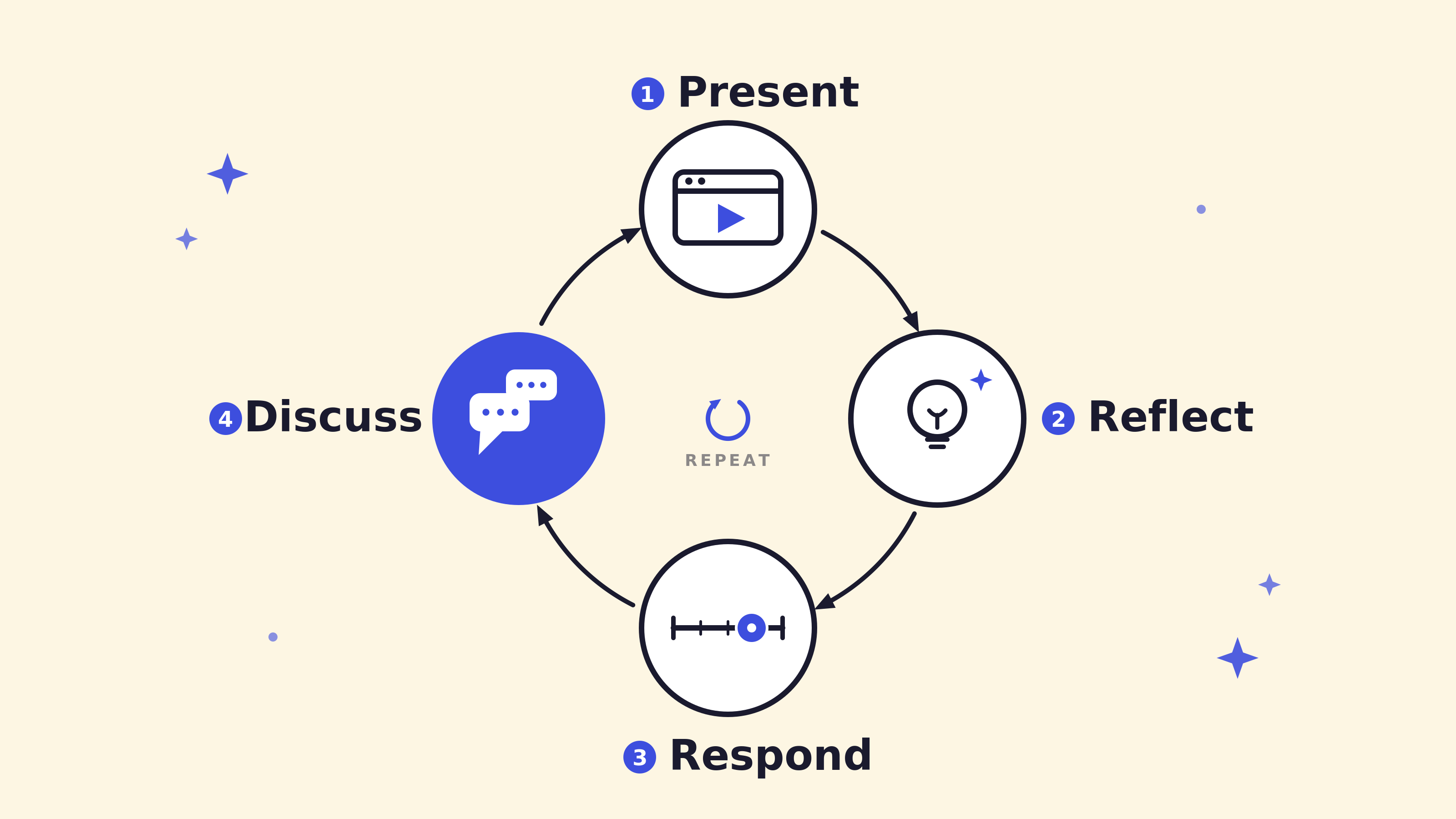
Designing for discussion: Why dialogue is the destination
A guide to designing learning around a simple rhythm that sparks richer conversations.
Read more →
Designing for psychological safety in group learning
Cultivate safe learning environments that foster deeper understanding and transformation.
Read more →
Unlock the future of group learning: 3 myths dispelled
With this fresh perspective, see how organisations can unlock the future of group learning
Read more →
 Enterprise customization
  Flexible pricing
  Support while you scale
  Account management